
Reviews
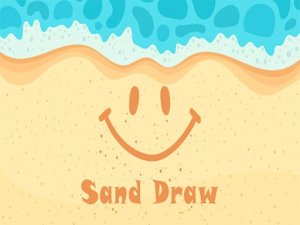
Beach Sand Sketch Studio offers a peaceful creative outlet for all ages. The touch controls work smoothly on tablets, and the variety of brush sizes and colors allows for detailed artwork. Saving creations as photos is simple. The beach theme adds a calming element that sets it apart from other drawing games. It is a great choice for family fun or personal relaxation.
Description
Game Introduction
Beach Sand Sketch Studio offers a creative online space where players can produce artwork on a virtual sandy canvas. This game provides a calm environment for artistic expression, suitable for children and adults alike. The beach-themed setting adds a soothing backdrop that encourages relaxation while drawing. Players can write notes, create decorative patterns, or simply enjoy the process of making art. The game focuses on the joy of creation without any stressful elements. It serves as a gentle introduction to digital drawing for newcomers and a pleasant diversion for experienced artists. The simple interface makes it easy to start immediately, and the ability to save creations allows users to keep a record of their imaginative work.
How to Play
Getting started with Beach Sand Sketch Studio is straightforward. Players use a mouse or touch input to draw lines and shapes on the sand surface. The game offers a selection of drawing tools and color options that can be changed at any time. By adjusting the brush size, users can create fine details or broad strokes. The canvas responds instantly to movements, allowing for precise control. To erase mistakes, an eraser tool is available. Once a piece is complete, it can be saved as an image file directly from the game. No account creation or software installation is required, making it accessible from any modern web browser.
Game Features
This online drawing tool includes a variety of features designed for ease of use and enjoyment. Multiple brush sizes and a palette of colors allow for diverse artistic styles. The touch-friendly controls work well on tablets and smartphones. A save function lets users download their artwork as a photo. The beach-themed graphics create a peaceful atmosphere. The game operates without advertisements during play, providing an uninterrupted creative session. These elements combine to offer a straightforward and pleasant drawing experience.
Tips for Success
To improve your sand art, try using different brush sizes to add variety to your drawings. Begin with simple shapes or letters to build confidence. The eraser tool can be used to correct errors or to create highlights. Save your work often to prevent loss. Practicing smooth motions will result in cleaner lines. Taking short breaks can help maintain a fresh perspective on your project.
Compatibility
Faq
Similar Titles

Prom Dress Boutique: Style & Time

Gear Master: Precision Toss Arcade

Aqua Dash Ocean Speed Challenge

Forest Defender: Eco Strategy
Ocean Coin Dive Quest
Ocean Explorer: Shark Journey

Santa Shark Ocean Journey

Prehistoric Dino Duo Arcade Adventure

Bag Art 3D Fashion Studio

Fairy Academy Style Creator

Anime Doll Stylist & Makeover

Player Comments
Sign in to comment
You must be logged in before posting a review or rating.
No account? Create one
No comments yet. Be the first to comment!